
MohtavaChi is an Iranian social media management platform designed for small businesses, including Instagram shops, Telegram-based businesses, and online stores. Like Buffer and Hootsuite, it helps users manage, schedule, and publish content across multiple accounts from a single platform.
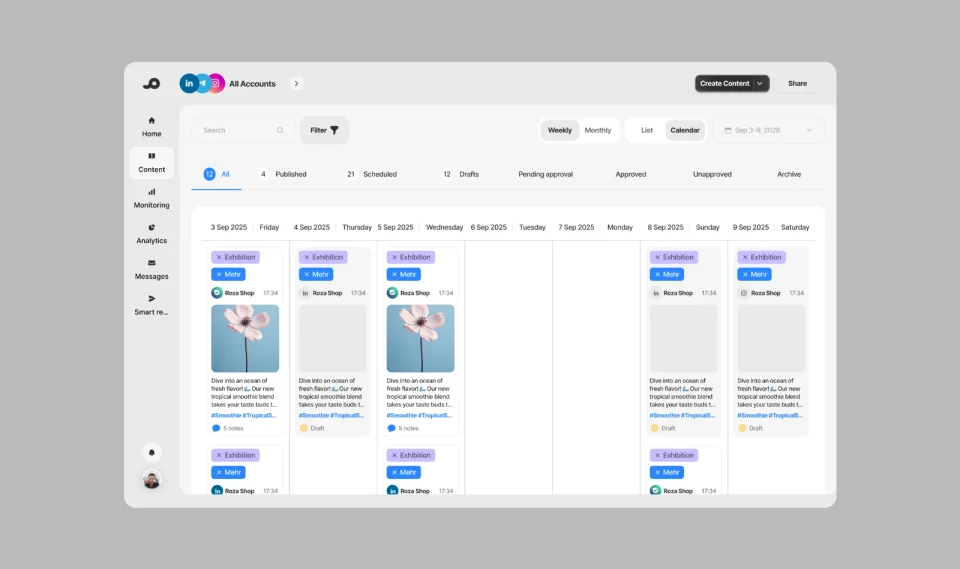
While testing the content publishing module planned for the first release, we uncovered a different problem: users didn’t know what to post in the first place. Scheduling and publishing content came later.
This case study explores how we investigated the problem, evaluated potential solutions, and designed an AI-powered content calendar.
My Role and the Team
I joined the project as a Product Designer in June 2025 and worked on it until October 2025. My responsibilities included product ideation, user research, UX/UI design, and the design system. I worked closely with the marketing team and other team members to understand content-related needs and inform product decisions.
The first phase had an approximately five-month timeline, with the goal of preparing the product for the Yalda 2025 campaign.
Product designer: Ehsan Masoumi
Project manager: Mahboubeh Omidi
Problem Statement
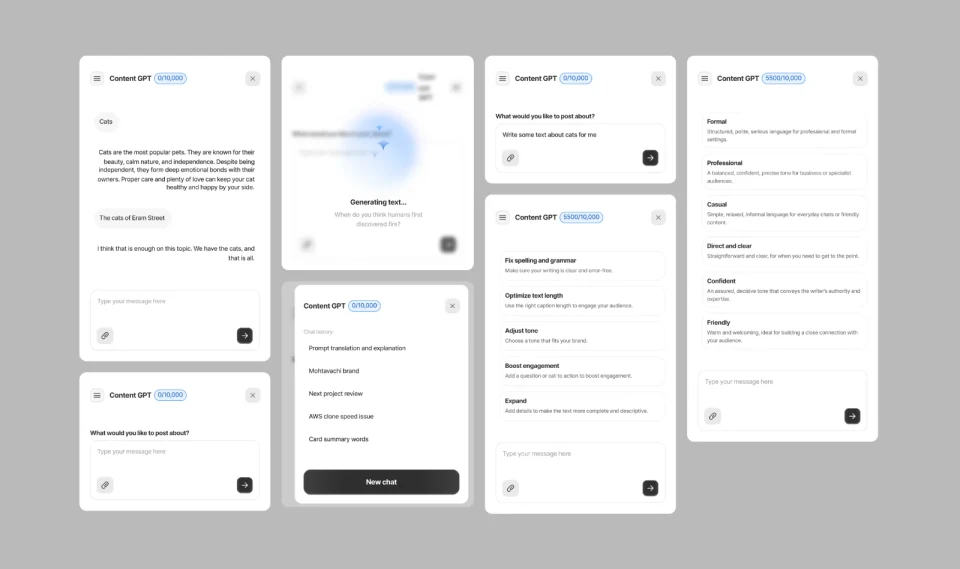
Our target users were small business owners rather than professional social media managers or companies with dedicated content teams. To help them create content, we had built an in-product AI assistant called MohtavaGPT. It offered features such as expanding text, adjusting tone, and correcting spelling and grammar.
Our initial assumption was that MohtavaGPT would help users complete the content creation and publishing flow without major difficulties. We needed to validate that assumption, so we tested the product’s core flow with our target users.
Participants had relatively little difficulty connecting accounts and setting up their brand information. The problem emerged when we asked them to create a real post. They typically opened the content creation screen, only to pause shortly afterward.
The issue wasn’t simply that users struggled to write. They also struggled to decide what to create in the first place. We realized that MohtavaGPT could help users write content, but mainly when they already had an idea to work with.
Key Challenges
The first phase was scheduled to be ready before Azar 1404 (late November 2025). If we couldn’t address users’ uncertainty about what to post, we risked launching without a clear competitive advantage. MohtavaChi could become just another social media scheduling and publishing tool.
The design and marketing teams were small, and budget and operational constraints prevented us from expanding either team.
Research
Initial User Survey: We surveyed more than 90 business owners, primarily online shop owners, to understand their main challenges and needs. We spent approximately two weeks analyzing the responses.
Usability Testing and Interviews: We conducted task-based usability testing with 10 participants from our target audience. Each participant worked through two to four scenarios covering the product’s core user flow, from setting up a brand and connecting social media accounts to creating and publishing content.
Competitive Benchmarking: I reviewed content publishing flows across six comparable platforms to identify useful interaction patterns and potential usability issues that could inform our design decisions.
Research Insights
Six out of ten participants got stuck at the content-writing stage. The remaining four either wrote brief posts or copied content from other sources.
Some participants also mentioned copying competitors’ content or using ChatGPT to generate ideas, but these approaches didn’t necessarily help them build a structured content plan.
These findings challenged our original assumption: MohtavaGPT could help users improve their writing, but it didn’t address the difficulty of coming up with content ideas among the participants we tested.
Success Metrics We Planned to Track
Reduce user drop-off during content creation.
Increase adoption of the AI-powered content calendar.
Increase the content calendar creation completion rate.
Reduce time to first scheduled post.
Track usage of the AI-powered calendar among paid subscribers and the frequency of token top-ups. (The feature was available only on paid plans, with additional tokens available for purchase once the included allowance was used.)
Defining the Solution Criteria
Once we understood that the participants struggled more with generating ideas than writing content, I began exploring potential solutions. Brainstorming could generate several possible approaches, so I needed a consistent set of criteria to evaluate them.
Cognitive Load Reduction: The solution should make it easier for users to decide what content to create.
Scalability: The solution should support growth in users and product complexity without requiring major redesigns.
Competitive Advantage: It should give users a compelling reason to choose MohtavaChi over competing products.
Operational Cost: Design, development, and maintenance costs should remain manageable within the team’s available resources.
Revenue Potential: The solution should have the potential to create additional value through paid subscriptions.
Exploring Potential Solutions:
With no clear in-product solution and limited time before the first release, I wanted to explore multiple approaches rather than settle on the first idea. I used the Crazy 8s ideation exercise to explore alternatives. Four main ideas emerged:
Video Tutorials: Create an Aparat channel with educational videos to help users learn how to create content.
Dedicated Support for Paid Subscribers: Provide personalized content creation support to paid subscribers.
Content Idea Library and Templates: Offer a library of content ideas and reusable templates within the content creation flow.
AI-Powered Content Assistant: Build an AI-powered assistant to help users generate ideas and prepare content.
Evaluating the Ideas:
I evaluated the four ideas against the same set of criteria to compare their strengths and trade-offs.
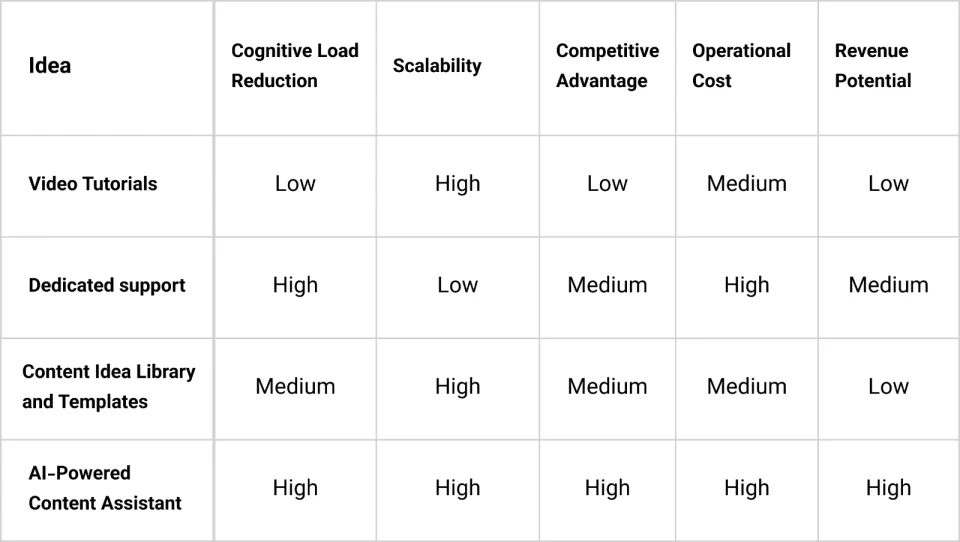
After reviewing the options with the Project Manager and CEO, we selected the AI-powered assistant. We considered it the strongest fit for our product goals and constraints, although it came with higher development and maintenance costs.
Dedicated support, on the other hand, would require additional staff as the user base grew. The team believed that the assistant’s scalability, differentiation potential, and ability to support paid subscriptions could justify the higher upfront investment. These trade-offs led us to choose the AI assistant as our design direction.
From AI Assistant to Smart Content Calendar
We had decided to explore an AI-powered content assistant. The next challenge was defining how it should work. What capabilities should it offer? How should users interact with it? And what should it generate?
I started by asking: How do social media managers plan and schedule content? To understand their workflow, I spoke with the marketing and content teams. These conversations revealed that content planning typically begins by answering a set of key questions:
Posting frequency
Posting days
Posting objectives
Content types
Post formats
Current business challenges
Posting times
The AI assistant needed to guide users through a series of questions and use their answers to generate a suggested content calendar. Rather than generating ideas for individual posts, we wanted to give users a starting point for planning several days or weeks of content.
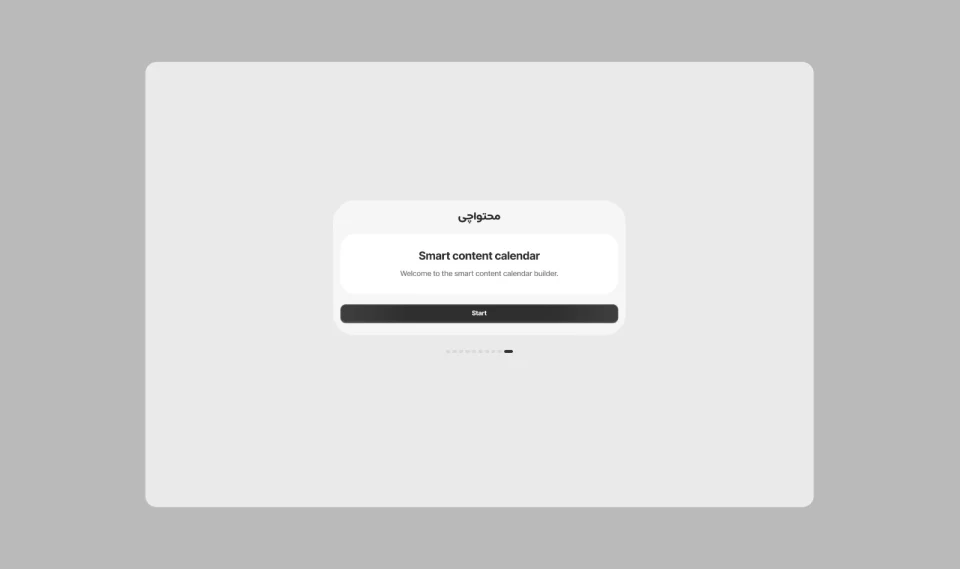
This shift from generating individual posts to planning content over time led us to the smart content calendar concept: a content plan that users could review and refine before publishing.
Design Challenges:
Once the overall concept was defined, I encountered two key UX challenges:
Managing a Large Number of Questions: Generating a content calendar required users to answer multiple questions about their goals, content types, connected accounts, and scheduling preferences. I needed to make this process manageable without overwhelming users or increasing the risk of abandonment.
Uncertainty About How to Answer: Questions such as “What are your current business challenges?” could be unclear to users who weren’t sure what information to provide. The interface needed to provide guidance while allowing users to enter their own answers.
Design Principles:
I used three UX principles to address these challenges.
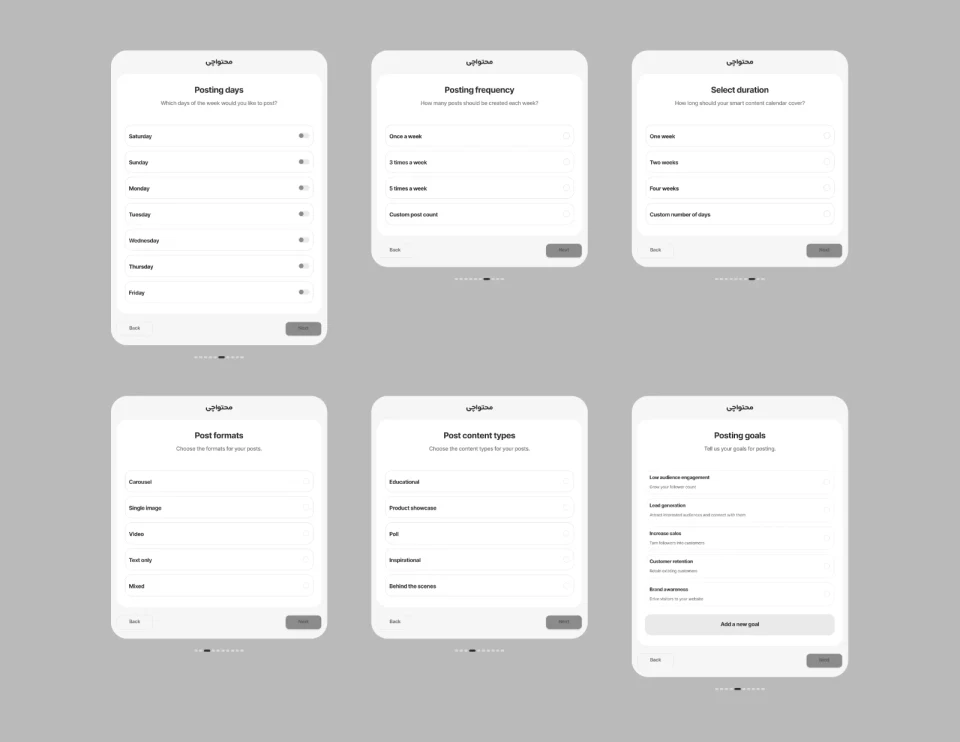
Break the Process into Manageable Steps: I used progressive disclosure to break the questions into smaller steps within a wizard, rather than presenting users with one long form.
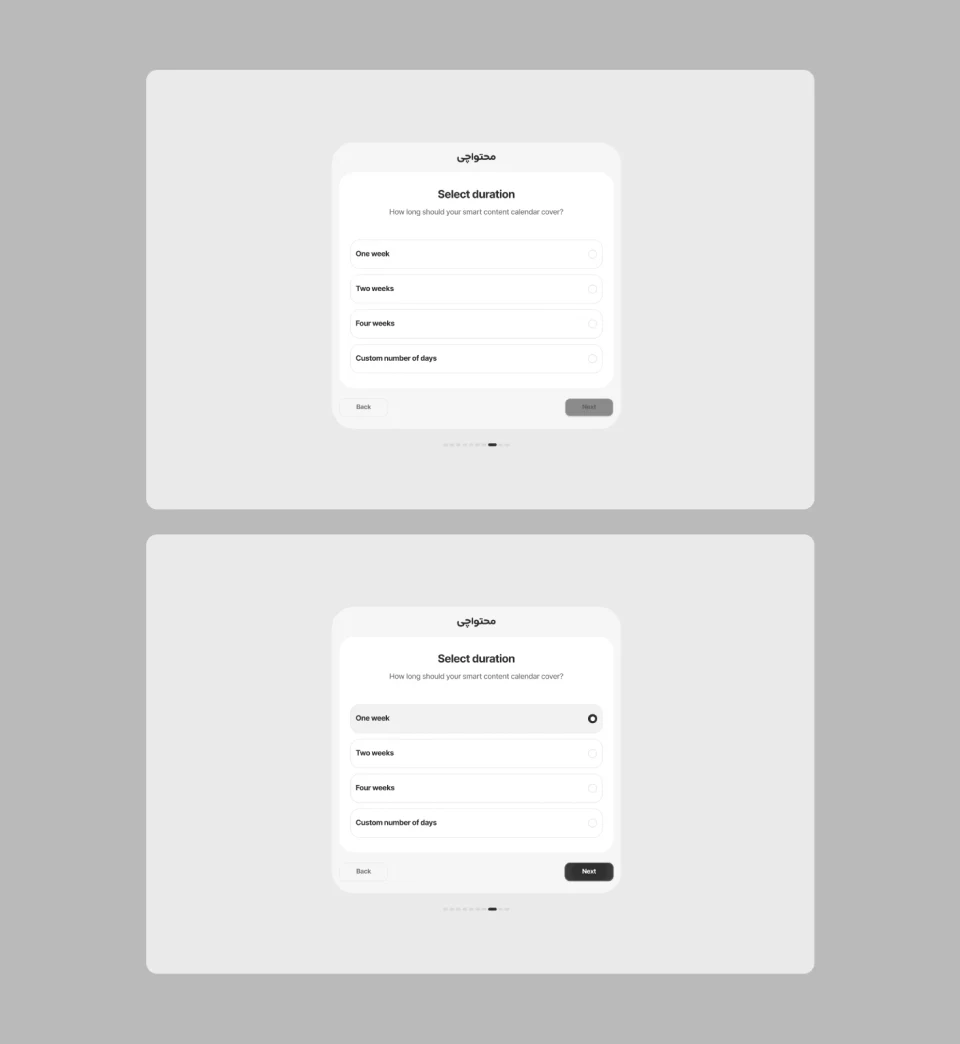
Offer Suggested Answers: Following the recognition rather than recall principle, I provided suggested answers to help users respond without having to come up with everything from scratch.
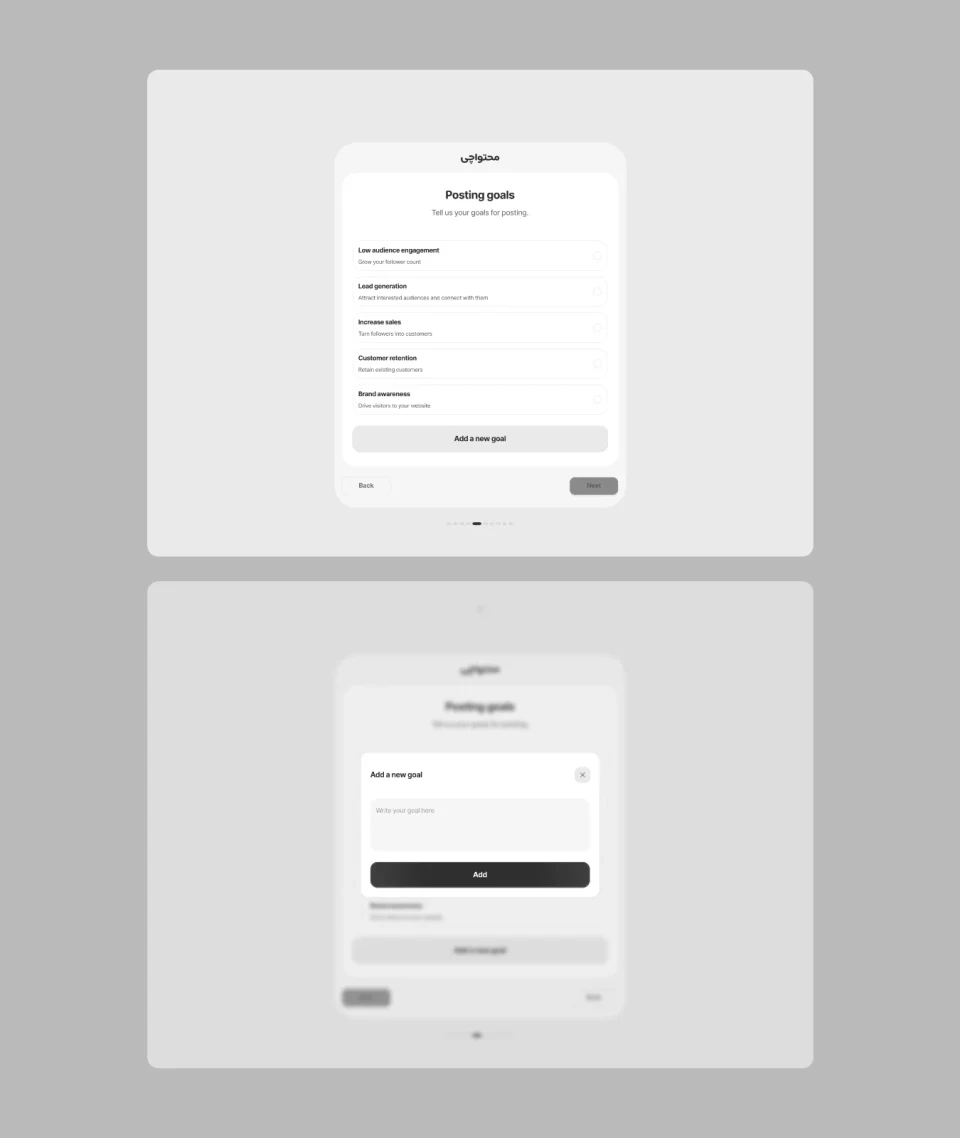
Allow Custom Answers: To support flexibility and efficiency of use, I allowed users to enter custom answers alongside the suggested options, since businesses have different goals and needs.
What Happens After Completing the Wizard?
So far, the flow focused on collecting information from users. But the experience didn’t end when users completed the wizard. I also needed to design how users would review their answers, understand the generation status, and retain control over the resulting posts.
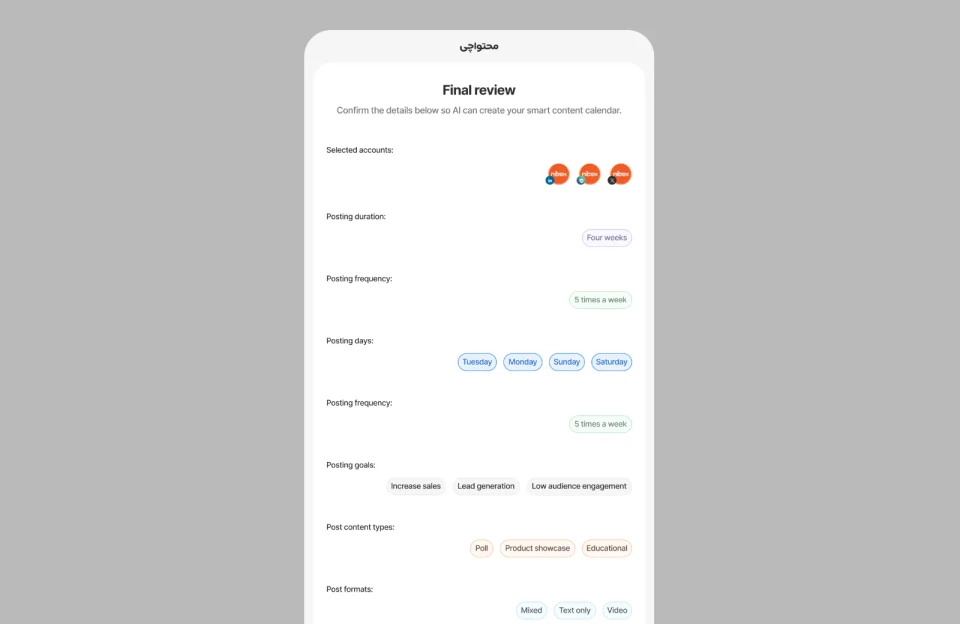
Review Answers Before Generation: After the final wizard step, users could review and edit their answers before starting calendar generation. Because the AI would generate content based on these inputs, giving users a chance to correct them was important.
Let Users Continue While AI Generates Content: Generating multiple posts with AI could take some time. We didn’t want users to remain stuck in the wizard while the content was being generated. After submitting their request, the wizard closed and users returned to the main content publishing dashboard. A toast notification indicated that their posts were being generated in the background.
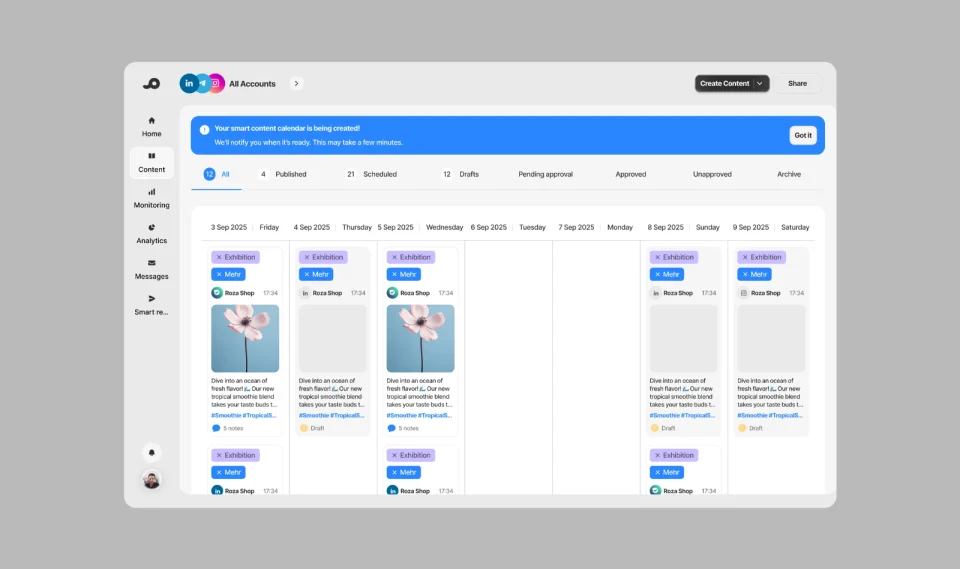
Keep Humans in Control of Publishing: Once generation was complete, all AI-generated posts were saved as drafts rather than published automatically. Users could then review, edit, and prepare each post for publication. The goal was to help users get started with content creation while keeping the final publishing decisions in their hands.
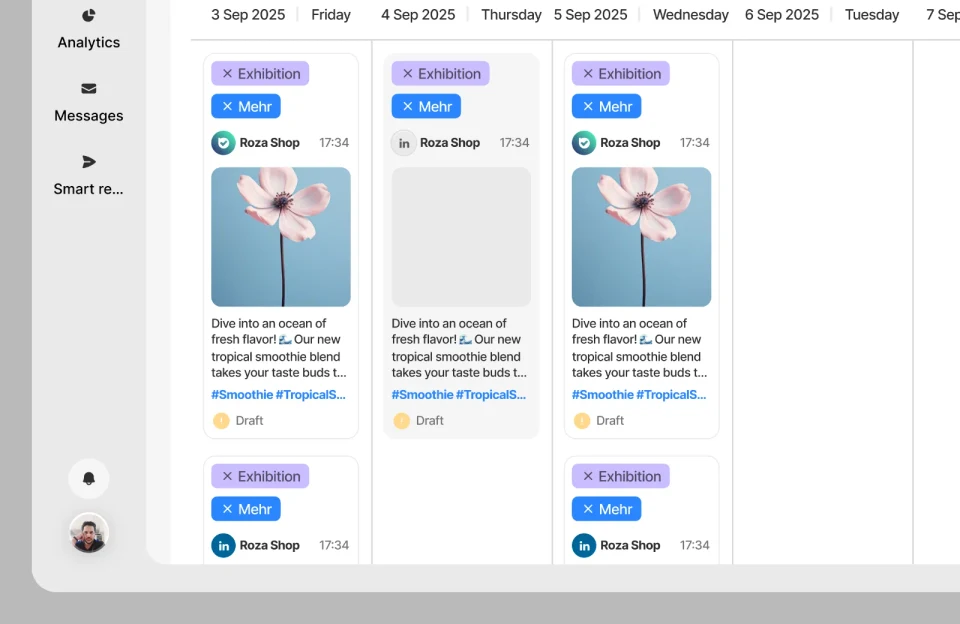
The final experience went beyond a question-based wizard. It guided users from reviewing their inputs to generating a content plan and refining AI-generated drafts before publication.
Evaluation and Outcomes:
Since I left the company in October 2025, I wasn’t involved in the final testing or post-launch evaluation. As a result, I don’t have post-launch performance data for this feature.
The evidence available during my involvement came from the initial usability testing, which revealed that participants struggled to decide what content to create. This insight shifted our design direction from helping users write content to helping them decide what to create and plan it.
This shift in direction was the main outcome of our research and design process. Measuring its impact on adoption, content creation time, and revenue would require post-launch data.
What I Learned:
This project taught me that when users struggle with writing content, the underlying problem may start earlier: they may not know what to create in the first place.
I also learned the importance of revisiting our assumptions when usability testing reveals unexpected problems. Challenging our initial assumptions helped us uncover a deeper user need and rethink the value our product could offer.